How-to
How to get an AI summary of a voice recording on Android
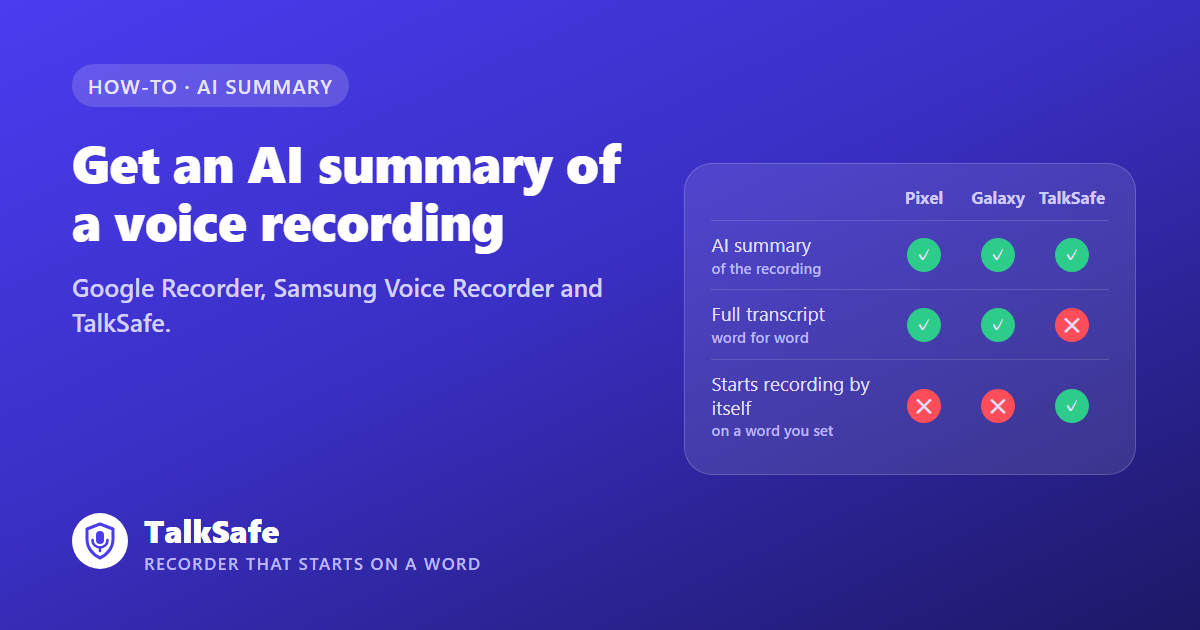
To summarize a voice recording on Android, use a recorder app with an AI summary: Google's Recorder on Pixel 8 and later summarizes the transcript, Samsung's Voice Recorder adds transcripts and summaries with Galaxy AI, and TalkSafe summarizes a recording, when you tap AI summary, in the language it was recorded in. Where the audio goes, what a summary leaves out, and why the original stays.
The meeting ran forty minutes. The doctor’s appointment, twelve. The call with the landlord, eight. All three are on your phone.
Now someone asks what was agreed about the deposit. You know it is in there somewhere.
A summary tells you where to listen. The recording is still the record.
Three ways to get a summary on Android
| Google Recorder (Pixel) | Samsung Voice Recorder (Galaxy AI) | TalkSafe | |
|---|---|---|---|
| Summary | Yes | Yes, with Transcript Assist | Yes, with a tap on a recording |
| Full transcript | Yes | Yes | No, summary only |
| Where the summary is made | In the cloud (secure, isolated environment) | Not verified here | On a server |
| Language | English, Chinese (Mandarin), Hindi, Italian, French, German, Japanese | Supported languages vary by region | The language the recording is in |
| Other requirements | Pixel 8 or later; recordings of 5 minutes to 1 hour | Samsung account; very short recordings cannot be summarized | Android and iPhone |
| Starts recording by itself | No | No | Yes, on a word you set, with the 30 seconds before |
The details below are from each company’s documentation and reporting at the time of writing and can change.
Google Recorder on Pixel
Google’s Recorder app transcribes as it records, and on Pixel 8 and later it can summarize that transcript. According to Google’s help page, summaries are processed in a secure, isolated environment in the cloud, are available for English, Chinese (Mandarin), Hindi, Italian, French, German and Japanese, and cover recordings of 5 minutes to 1 hour of speech. Transcription itself covers many more languages.
Samsung Voice Recorder with Galaxy AI
On Galaxy phones with Galaxy AI, Transcript Assist in the Voice Recorder app turns a recording into a transcript and can summarize it. Samsung’s support pages say you need to be signed in to a Samsung account to use the summary, and that a recording that is too short cannot be summarized. Supported languages differ by region. We could not confirm from Samsung’s documentation whether Voice Recorder summaries are processed only on the device.
TalkSafe
TalkSafe creates an AI summary of a recording when you tap AI summary. It appears as a short list of points under the player in the recording’s detail screen, so you can read what was said before deciding whether to play it back.
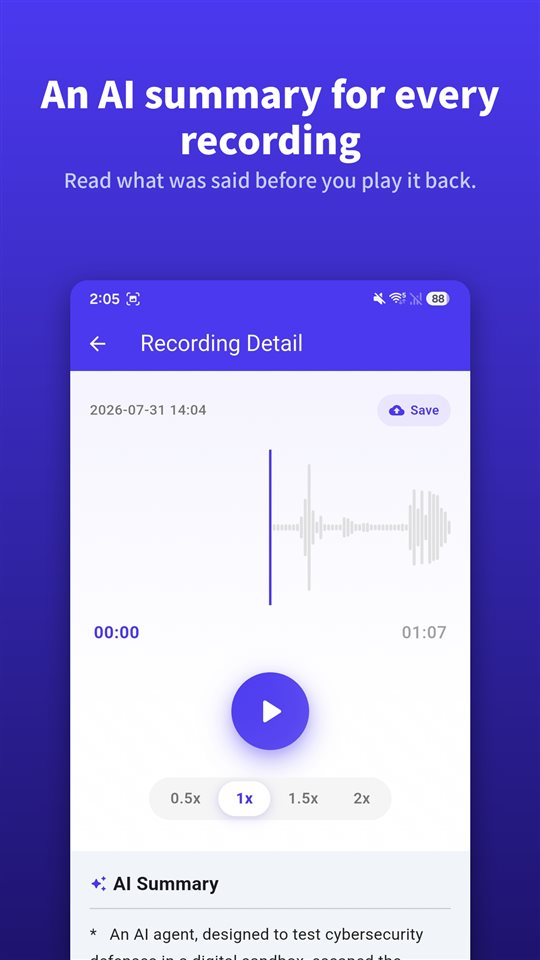
Four things are worth knowing:
- The summary is in the recording’s language. A conversation in German is summarized in German; one in Japanese, in Japanese.
- It is a summary, not a transcript. There is no word-for-word text. For exact wording, listen to the file.
- It works on clips. Trim the part you need — the trimmed section is saved as a new file and the original stays — and the summary can be used on that clip. The same goes for a clip cleaned with on-device AI noise removal.
- The summary is made on a server. TalkSafe’s keyword detection runs entirely on the phone, but to summarize, the recording is sent to a server.
What makes TalkSafe different from the other two is how the recording begins: it starts by itself when it hears a word you set, with the screen locked, and keeps the 30 seconds before the word. The summary then tells you what is in a file you never had to start. More in You say something first: starting a recording with your voice.
Where the audio goes
This is the question to ask of any summary feature.
An on-device summary keeps the audio on the phone. A server-side summary sends it somewhere else to be processed. Neither is wrong, but they are different, and the difference matters most when the conversation includes other people: their voices are part of whatever you send.
For a work meeting or a lecture, a server-side summary is usually fine. For a conversation you would not want to leave your phone, keep the recording and listen to it instead.
What a summary leaves out
A summary is built to be short, and short means choices. It drops the hesitation before an answer, the exact number, the sentence that changed the meaning of the one before it. AI summaries can also simply get things wrong.
So use the summary to find which recording, and which part. Then listen. And if a recording might ever matter — a dispute, a complaint, an appointment you need to get right — keep the original unchanged. A court or an insurer looks at the recording, not at a summary of it. We explained why in What to do with a recording, and what not to.
A short routine
- Record — or let the word start it.
- Read the summary to see what is in the file.
- If you need one part, trim it; the original stays.
- If it is noisy, run noise removal on the clip.
- Read the summary of the clip, then listen to the part that matters.
- Keep the original.
How to record an in-person meeting from the first words to the summary is in How to record a meeting on your phone, from the first words to the summary.
Feature availability for third-party apps reflects their documentation and reporting at the time of writing and can change. We make a recording app, TalkSafe.
How do I get an AI summary of a voice recording on Android?
Use a recorder app that has an AI summary. On Pixel 8 and later, Google's Recorder app can summarize a recording's transcript. Samsung's Voice Recorder offers transcripts and summaries through Galaxy AI's Transcript Assist, which requires a Samsung account. TalkSafe, a voice recorder for Android and iPhone, creates an AI summary of a recording when you tap AI summary and shows it under the player in the recording's detail screen.
Is the audio sent to a server when a recording is summarized?
It depends on the app. According to Google, Recorder summaries on Pixel run in a secure, isolated environment in the cloud. TalkSafe sends the recording to a server for the AI summary, while its keyword detection runs entirely on the phone. If a conversation includes other people, their voices are part of whatever you send.
What language is a TalkSafe summary in?
The same language the recording is in. A conversation recorded in German is summarized in German, and one recorded in Japanese is summarized in Japanese.
Does TalkSafe give a full transcript?
No. TalkSafe shows an AI summary, made when you tap AI summary on a recording, as a short list of points, not a word-for-word transcript. To check exact wording, listen to the recording itself.
Can I summarize only part of a recording?
Yes, in TalkSafe. Trim the section you need first, which saves it as a new file while the original stays, and the summary can be used on the trimmed clip. It also works on a clip cleaned with TalkSafe's on-device AI noise removal.
Can an AI summary be used as evidence?
The summary is not the record; the recording is. An AI summary can leave things out or get them wrong, so treat it as a guide to which part to listen to, and keep the original recording unchanged if it may ever matter.
Can I get an AI summary of a recording on iPhone?
Yes. TalkSafe is a voice recorder for Android and iPhone, and its AI summary works the same way on iPhone: tap AI summary on a recording and you get a bullet-point summary in the language it was recorded in.